
Webmail with Dropbox
Attach Dropbox Files Into Webmail With A Single Click
We’re releasing a new feature that allows you to easily attach files directly from your Dropbox into Webmail. This means that after a quick “account sync,” all of your Dropbox files are just a click away. Since your recipient is downloading the file from Dropbox, you can send attachments of virtually any size – no need to sweat the size limit.
In case you don’t know, Dropbox is one of the world’s premier file storage and sharing platforms. In their own words:
“Dropbox is a home for all your photos, docs, videos, and files. Anything you add to Dropbox will automatically show up on all your computers, phones and even the Dropbox website — so you can access your stuff from anywhere.”
With a user base of more than 300 million users integrating with Dropbox was a no-brainer. We really think the usefulness and simplicity of this feature is going to make our customers really happy.
How does it work?
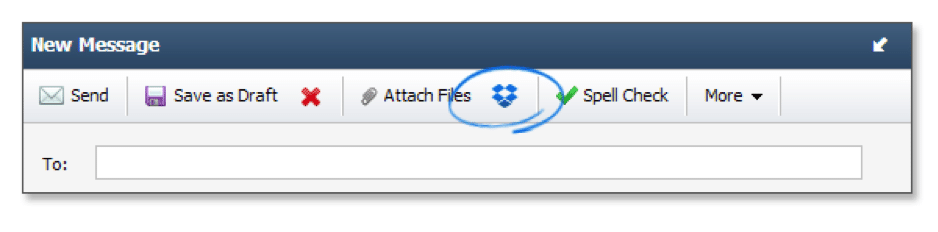
1) In Webmail, you’ll now see a Dropbox icon in your compose toolbar. Click it to attach files from Dropbox to your email message.
2) After your initial sign-in, you will automatically be logged in to Dropbox – and stay that way for as long as your primary Dropbox session lasts.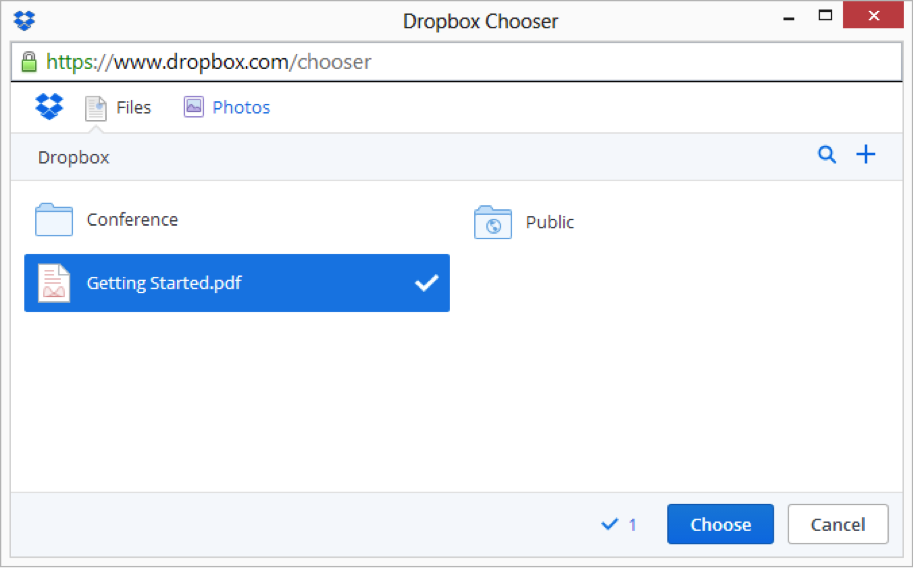
3) The file you choose will be embedded in your email message as a link – ready for download by its recipient.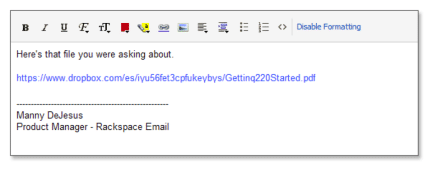
Dropbox and the Dropbox logo are trademarks of Dropbox, Inc.